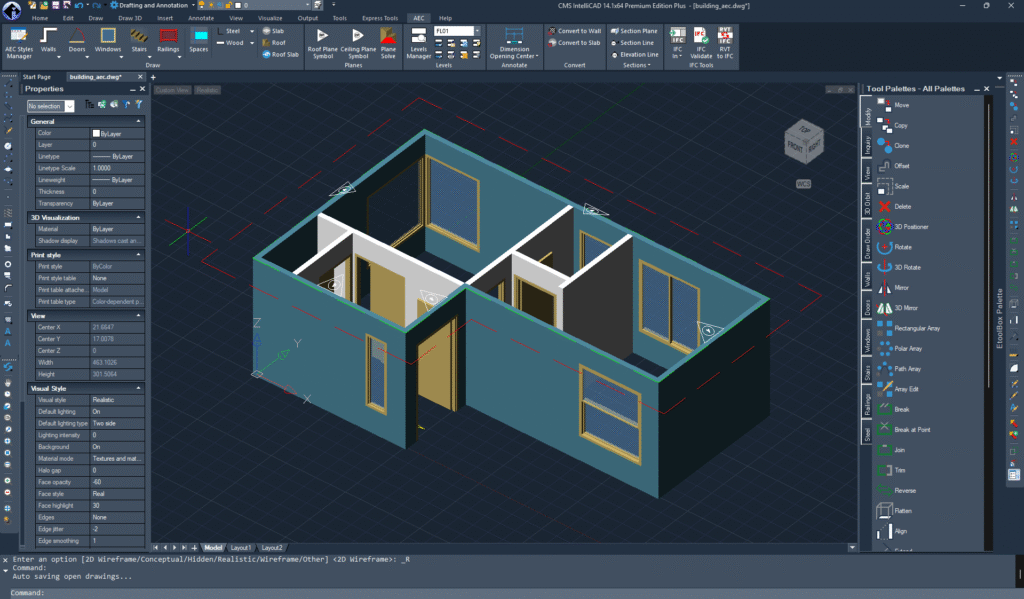
Big news for the CMS IntelliCAD PE PLUS community! If you are a licensed user, your toolkit just got a significant power-up. We are excited to announce the release of 12 brand-new online training videos specifically designed to help you master architectural and structural design within the IntelliCAD environment.
Whether you are transitioning from other CAD platforms or looking to sharpen your 3D modeling skills, these tutorials provide a focused, step-by-step roadmap to building a complete digital structure.
What’s Covered in the New Series?
This video series moves beyond basic lines and circles, diving deep into the AEC (Architecture, Engineering, and Construction) features that make CMS IntelliCAD a powerhouse for designers.
Here is a breakdown of the 12 key modules:
- Exterior & Interior Walls: Learn to define wall thicknesses, heights, and alignment to create accurate floor plans in record time.
- Doors & Windows: Master the insertion of parametric openings that automatically heal wall segments and maintain architectural integrity.
- Stairs & Rails: Tackle complex vertical circulation with ease, including customizable tread depths and railing styles.
- Roofs & Slabs: Discover how to generate multi-slope roofs and floor slabs that snap perfectly to your wall boundaries.
- Wood & Steel Sections: Dive into structural detailing. These videos show you how to utilize the library of wood and steel profiles for framing and industrial design.
Why These Videos Matter
Modern CAD design is about more than just “drawing”; it’s about intelligence. These new tutorials focus on:
- BIM Compatibility: Understanding how these elements interact with Building Information Modeling workflows.
- Efficiency: Learn the shortcuts and command-line tricks that veteran designers use to shave hours off their drafting time.
- Accuracy: Ensure your wood and steel sections meet industry standards by using the built-in library tools correctly.
How to Access the Training
As a licensed CMS IntelliCAD user, these resources are often available directly through your user portal or the official “Download” section of the CMS website.
Tip: If you are running the latest version (v12 or the newly released v14), these videos are specifically optimized for the ribbon interface and engine enhancements you use every day.
Elevate Your Workflow Today
The jump from 2D drafting to full architectural modeling can feel daunting, but it doesn’t have to be. With these 12 videos, you have a private tutor guiding you through every slab, rail, and rafter.
Are you ready to build? Head over to the CMS IntelliCAD portal and start your first lesson. Your next project will thank you for it.
What specific architectural feature do you find most challenging to model in 3D right now?